
Smart Deadbolt Installation Cost Guide 2026
Complete pricing guide for keypad, fingerprint, and app-controlled smart deadbolts
Smart Deadbolt Cost Overview
Entry Level
Mid-Range
Premium
Installation
Smart Deadbolt Installation & App-Control Example
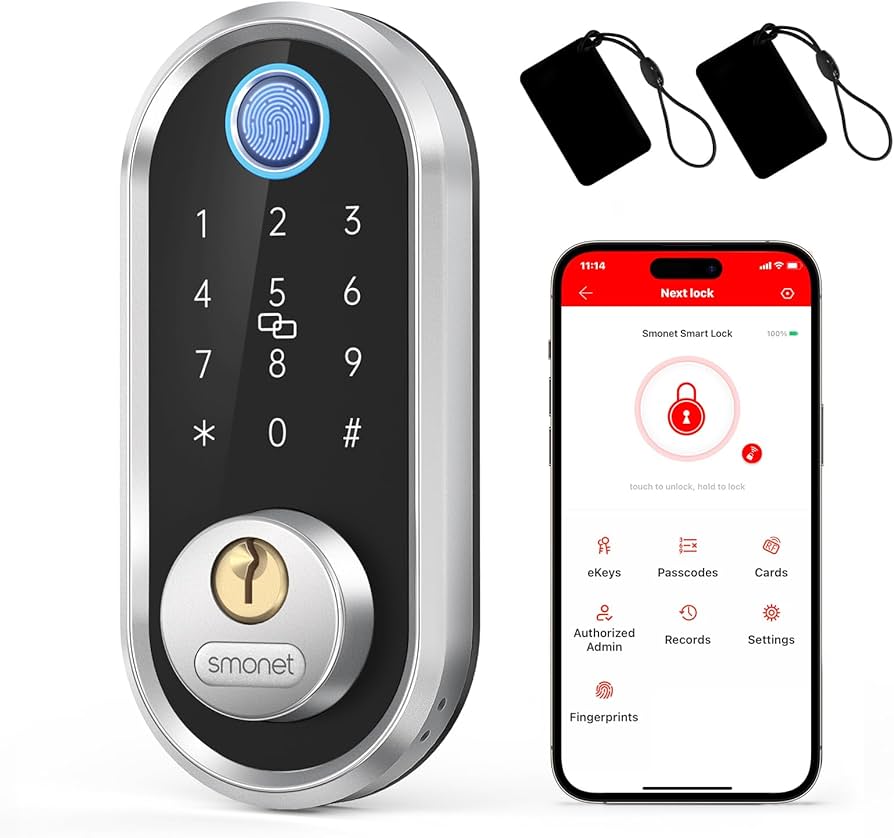
Smart Deadbolt Types & Features
Understanding the technology options and their real-world applications
Complete Smart Deadbolt Comparison 2026
| Lock Type | Price Range | Key Features | Battery Life | Best For |
|---|---|---|---|---|
| Keypad Only | $80 – $180 | Code entry, multiple users | 12-18 months | Simple upgrade needs |
| Bluetooth Smart | $150 – $250 | Phone unlock, guest codes | 6-12 months | Tech-savvy homeowners |
| WiFi Connected | $200 – $350 | Remote access, notifications | 4-8 months | Full smart home integration |
| Z-Wave/Zigbee | $180 – $300 | Hub required, automation | 8-12 months | Existing smart home hubs |
| Biometric | $250 – $400 | Fingerprint unlock, backup codes | 6-10 months | Maximum security needs |
| Multi-Protocol | $280 – $400 | WiFi + Bluetooth + Z-Wave | 4-6 months | Future-proofing |
Top Smart Deadbolt Brands & Models
Professional analysis of the leading smart lock manufacturers
August Wi-Fi Smart Lock
Retrofit design: Keeps existing exterior
Features: Auto-unlock, guest access
Battery: 4-6 months typical
Integration: Alexa, Google, Apple
Best for: Existing deadbolt upgrade
Schlage Encode Plus
Built-in WiFi: No hub required
Features: Apple HomeKit, Alexa
Battery: 12+ months
Security: Commercial grade
Best for: Apple ecosystem users
Yale Assure Lock SL
Touchscreen: No visible keypad
Modules: Add connectivity later
Battery: 8-12 months
Durability: Weather resistant
Best for: Clean aesthetic needs
Kwikset Halo Touch
Fingerprint: 100+ user capacity
Backup: Traditional key included
Battery: 6-8 months
Speed: 1-second unlock
Best for: Large families
Ultraloq U-Bolt Pro
6-in-1: Fingerprint, code, key, app
Value: Multiple unlock methods
Battery: 8-10 months
Installation: DIY friendly
Best for: Maximum flexibility
Level Lock Touch
Invisible: Looks like regular deadbolt
Touch: Card or phone to unlock
Battery: 12+ months
Premium: Highest build quality
Best for: Luxury homes
Installation Process & Costs
DIY vs professional installation comparison and requirements
Installation Methods & Pricing
| Installation Type | Cost Range | Time Required | Skill Level | What’s Included |
|---|---|---|---|---|
| DIY Installation | $0 – $30 | 30-90 minutes | Basic tools | Instructions, template, screws |
| Handyman Install | $75 – $125 | 45-60 minutes | Professional | Install, setup, testing |
| Locksmith Install | $100 – $175 | 60-90 minutes | Expert | Install, programming, warranty |
| Door Modification | $150 – $300 | 2-3 hours | Carpenter | Hole enlargement, reinforcement |
| New Door & Lock | $400 – $800 | 3-5 hours | Professional | Door replacement, lock install |
Installation Requirements Check
Measure first: Standard deadbolt hole is 2-1/8″. Some smart locks need 2-1/4″ or larger. Door thickness: Must be 1-3/8″ to 1-3/4″ for most locks. Backset: Distance from door edge to center of hole – typically 2-3/8″ or 2-3/4″. Power: All battery operated, but check voltage requirements.
Smart Lock Features & Technology
Understanding the capabilities that justify the investment
Remote Access Control
Lock/unlock from anywhere
• Check status remotely
• Receive entry notifications
• Grant temporary access
• Activity logs and history
Requires: WiFi or hub connection
User Code Management
Multiple access codes
• Family member codes
• Temporary guest codes
• Service provider access
• Time-limited codes
Capacity: 30-250 users typical
Smart Home Integration
Automation possibilities
• Lights on when unlocked
• Thermostat adjustment
• Security system arming
• Voice control commands
Works with: Alexa, Google, Siri
Geofencing & Auto-Lock
Location-based control
• Auto-unlock when arriving
• Auto-lock when leaving
• Customizable radius settings
• Multiple phone support
Battery impact: Moderate
Battery Monitoring
Never get locked out
• Low battery alerts
• Remaining life estimates
• Emergency power options
• 9V backup terminals
Typical life: 6-18 months
Security Features
Advanced protection
• Tamper alerts
• Wrong code lockouts
• Forced entry detection
• Encryption protocols
Standards: ANSI Grade 1 & 2
Real Estate Investment Analysis
Smart lock ROI for different property types
Primary Residence
Investment: $250-400 total
Benefits:
• Convenience for family
• No lost key costs
• Insurance may discount 2-5%
• Resale appeal to tech buyers
ROI: Convenience + security
Best choice: WiFi-enabled
Rental Property
Investment: $200-300 per door
Advantages:
• No rekeying between tenants
• Remote access for emergencies
• Attract tech-savvy renters
• Rent premium: $25-75/month
ROI: 20-40% annually
Best choice: WiFi-enabled
Fix & Flip Properties
Strategy: Temporary security
Approach:
• Use basic smart lock during construction
• Move lock to next project
• Install standard deadbolt for sale
• Mention “smart-ready” in listing
Cost: $150-200 reusable
Best choice: Battery keypad
Short-Term Rentals
Investment: $250-350 per unit
Essential features:
• Auto-code generation
• Check-in/check-out automation
• Guest access logging
• Remote troubleshooting
ROI: 5-star reviews
Best choice: WiFi + backup codes
Installation Requirements & Compatibility
Technical specifications and door preparation needs
Smart Lock Compatibility Requirements
| Requirement | Standard Specs | Most Smart Locks | Premium Models | Modification Cost |
|---|---|---|---|---|
| Door Thickness | 1-3/8″ to 1-3/4″ | Same range | Up to 2-1/4″ | $0 (compatible) |
| Backset Distance | 2-3/8″ or 2-3/4″ | Adjustable | Universal fit | $0 (adjustable) |
| Cross Bore Hole | 2-1/8″ diameter | 2-1/8″ to 2-1/4″ | Up to 2-1/2″ | $50-150 enlargement |
| Edge Bore Hole | 1″ diameter | 1″ standard | 1″ to 1-1/4″ | $25-75 if needed |
| Strike Plate | Standard mortise | May need adjustment | Usually compatible | $20-50 modification |
| Door Material | Wood, metal, fiberglass | All compatible | All compatible | $0 (universal) |
Before You Buy Checklist
Measure your door: Use tape measure to verify thickness and backset distance. Check existing holes: Most smart locks fit standard deadbolt prep. Test WiFi signal: Ensure strong signal at door location. Power planning: Consider battery replacement schedule. Backup access: Always maintain key override option.
Battery Life & Maintenance Costs
Operating expenses and long-term ownership considerations
Annual Operating Costs by Lock Type
| Lock Type | Battery Type | Typical Life | Annual Cost | Usage Factors |
|---|---|---|---|---|
| Keypad Only | 4 AA batteries | 12-18 months | $8-12 | Low usage = longer life |
| Bluetooth Smart | 4 AA batteries | 8-12 months | $12-18 | Phone connections drain power |
| WiFi Connected | 4 AA batteries | 4-8 months | $18-36 | Always-on connectivity |
| Z-Wave/Zigbee | 4 AA batteries | 8-15 months | $10-18 | Hub communication efficient |
| Biometric | 4 AA batteries | 6-10 months | $14-24 | Fingerprint scanning power |
| Multi-Protocol | 4 AA batteries | 4-6 months | $24-36 | Multiple radios active |
Extend Battery Life
Use lithium batteries – last 2-3x longer than alkaline
Optimal temperature: Extreme cold reduces capacity significantly
Disable unnecessary features: Turn off auto-unlock if not needed
Power Management
Low battery alerts: Replace at 20-30% remaining
Backup power: 9V emergency terminals on most models
Schedule checks: Test batteries every 3 months
Cost Optimization
Buy batteries in bulk: Save 30-50% vs retail
Rechargeable option: Consider for high-usage locks
Track usage: Apps show battery drain patterns
Security Considerations & Best Practices
Protecting your smart lock from both physical and digital threats
Physical Security
Lock grade matters:
• ANSI Grade 1: Best (commercial)
• ANSI Grade 2: Good (residential)
• ANSI Grade 3: Basic
Reinforcement: Add door armor, longer screws
Backup key: Always have physical override
Digital Security
Strong passwords:
• Change default codes immediately
• Use complex user codes
• Enable two-factor authentication
Network security: Separate IoT network ideal
Updates: Install firmware updates promptly
User Management
Code discipline:
• Unique codes per person
• Delete old user codes
• Time-limit temporary access
Audit trail: Review entry logs regularly
Guest protocols: Clear guest access rules
Common Issues & Troubleshooting
Solving the most frequent smart lock problems
Connectivity Problems
Symptoms: App won’t connect, commands fail
Solutions:
• Check WiFi signal strength
• Restart router and lock
• Move router closer or add extender
• Update app and firmware
Battery Issues
Symptoms: Slow response, failed unlocks
Solutions:
• Replace all 4 batteries together
• Use name-brand alkaline or lithium
• Clean battery contacts
• Check for corrosion
Mechanical Problems
Symptoms: Lock won’t turn, grinding sounds
Solutions:
• Lubricate lock cylinder
• Check door alignment
• Adjust strike plate
• Verify proper installation
App & Software Issues
Symptoms: App crashes, features missing
Solutions:
• Update app to latest version
• Clear app cache/data
• Reinstall app if needed
• Check phone OS compatibility
Frequently Asked Questions
Expert answers to common smart deadbolt questions
Ready to Upgrade Your Home Security?
Explore more smart security options and professional installation guides

Knowledge Quiz: Smart Deadbolt Guide
Open Quiz
5 quick questions - see how much you learned!
1) What is the typical price range for entry-level smart deadbolts in this guide?
Answer: B
The “Smart Deadbolt Cost Overview” lists Entry Level locks at $150–$200 for basic keypad smart locks.
2) CRITICAL: Which smart deadbolt type has the shortest typical battery life according to the comparison table?
Answer: A
The “Complete Smart Deadbolt Comparison 2026” shows WiFi-connected locks at 4–8 months battery life, the shortest range listed, because WiFi stays active more often than other protocols.
3) What is the typical professional installation cost range stated in the guide?
Answer: C
The guide’s “Smart Deadbolt Cost Overview” lists installation at $75–$150 for professional install. The installation table also shows handyman installs typically $75–$125.
4) CRITICAL: What is the standard deadbolt cross-bore hole size mentioned in the installation requirements?
Answer: D
The “Installation Requirements Check” states the standard deadbolt hole is 2-1/8″. Some smart locks may require 2-1/4″ or larger, which can mean door modification costs.
5) Which property type does the guide say pays back smart locks fastest?
Answer: B
The “Investment Reality” section states smart locks pay for themselves fastest on rental properties due to eliminated rekeying costs and rent premiums ($25–$75/month).
🔒 More Home Security Guides
Explore our complete security system library
View All Security Guides (40+) ▼
👮 Professional Monitored Systems
📷 Security Cameras & Video
🔐 Smart Locks & Access Control
🚨 Sensors & Detectors
🔧 DIY & Self-Monitored
📱 Control & Monitoring
Last updated: Jan 2026
Sources: Smart lock manufacturers, locksmith associations, home security industry reports, Consumer Reports testing, Builds and Buys research team



